Before you begin
Prepare the following before you start so you can move through setup without interruption:- A registered business eligible for KYB verification
- An email address to create your Orbt partner account
Setup steps
1
Sign up as a partner
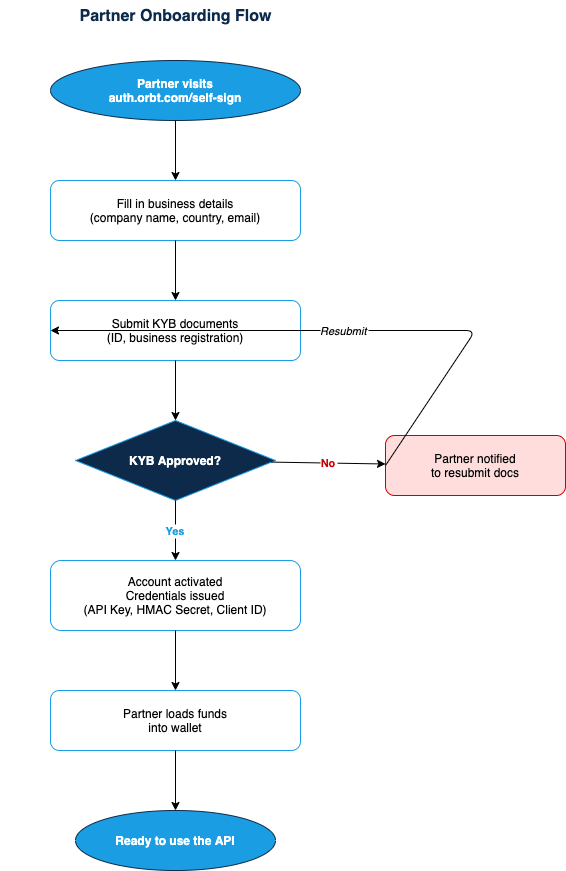
Sign up to Orbt here. On first login, you will be requested to change the temporary password and provide some details about your business.Enter a name your team will recognize when they see it in notifications, emails, and reports, which will be referred to as the Partner Name. Avoid internal codenames or project aliases.Once you confirm, Orbt team will review the submitted details and approve the account OR they will reach out to you for additional details. An email notification will be sent to the registered email.
2
Load funds into your wallet
From your dashboard, load funds into your partner wallet. This is the balance Orbt will draw from whenever you credit a consumer’s wallet. All consumer wallet credits are deducted from your partner balance.
3
Invite teammates
Navigate to **Team Member **and invite your the relevant team members who will be managing the account. Enter each teammate’s email address and assign them a role before sending the invitation:
- Admin: Full access to settings, billing, and all campaigns. Reserve this role for team leads or IT administrators.
- Technology: Can create and edit campaigns, manage API and Security settings such as Webhooks and IP Whitelisting . The right default for most IT contributors.
- Finance: Read-only access. Use this for stakeholders who need visibility on reporting but shouldn’t make changes.
4
Get your API credentials
From your dashboard, retrieve the following credentials. You’ll need all three to authenticate every API request:
- API Key: identifies your account
- HMAC Secret: used to sign each request
- Client ID: your unique partner identifier (UUID format)
5
Create your first consumer
With your credentials ready, create a consumer and fund their wallet in a single API call, or via Orbt Dashboard under Consumer tab. You can add Consumers one by one or by bulk upload.