> ## Documentation Index
> Fetch the complete documentation index at: https://docs.orbt.com/llms.txt
> Use this file to discover all available pages before exploring further.
# Authentication
Every request to the Orbt API must be authenticated using HMAC-SHA256 request signing. This ensures that requests are genuine, haven't been tampered with, and can't be replayed.
## Your credentials
You'll need three values from your partner dashboard:
* **API Key** — included in the `x-api-key` header
* **Client ID** — your partner UUID, included in the `x-client-id` header
* **HMAC Secret** — used to generate the signature (never sent directly)
## Required headers
Every API request must include the following five headers:
* `x-api-key` — Your API key
* `x-client-id` — Your client ID (UUID)
* `x-timestamp` — Current UTC timestamp in ISO 8601 format (e.g. `2026-06-03T10:00:00.000Z`)
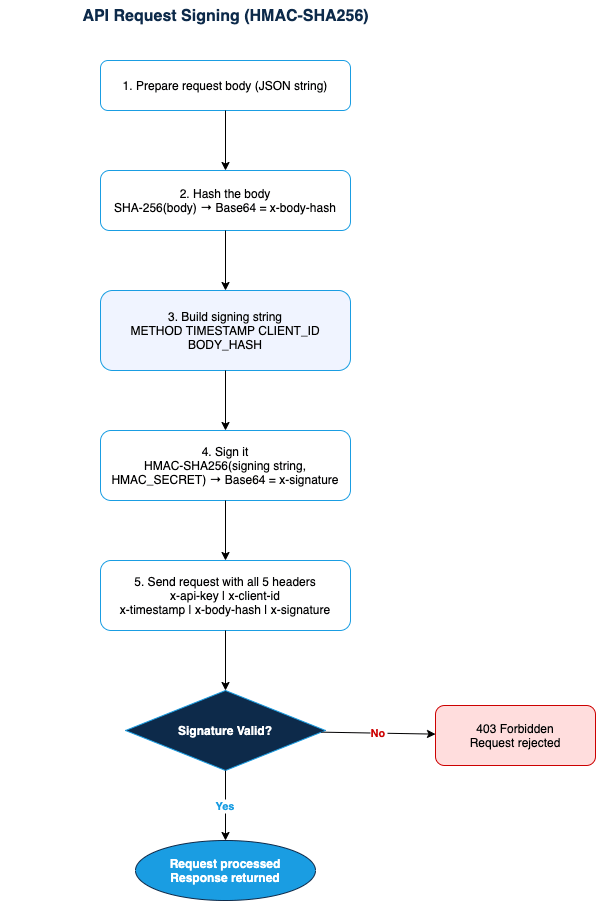
* `x-body-hash` — SHA-256 hash of the raw request body, Base64-encoded. For requests with no body (e.g. GET), hash an empty string.
* `x-signature` — HMAC-SHA256 signature (see below), Base64-encoded
## How to generate the signature
Build the string to sign by concatenating the following fields, each separated by a newline character (`\n`):
```text theme={null}
METHOD\n
TIMESTAMP\n
CLIENT_ID\n
BODY_HASH
```
Then sign that string using HMAC-SHA256 with your HMAC Secret, and Base64-encode the result.
Below is a flow diagram of the authentication steps.